Reserve with Google: The Upgrades, Experiences and Guests You Lose
A Google booking arrives as a name and a time. No experience, no private room, no pairing, no nationality, no consent to invite them back. Here is what that costs.
 RegilioCo-founder, Revasi
Insights12 min readPublished on October 8, 2026

Reserve with Google works. A guest searching your restaurant on Google Maps taps a button, picks a time, and the booking lands in your reservation system without ever visiting your website. For a venue competing for attention on a crowded map, that is a real channel, and the hardest part of the funnel is the part Google owns.
The question operators rarely ask is what the booking carries with it. A reservation made through the Google flow arrives with five fields: first name, surname, telephone number, email, and any note the guest typed. No experience. No room. No upgrade. No nationality. And no permission to contact that guest again.
It is tempting to read that as a fine dining problem. It is not. A pizzeria selling a Friday wine flight, a beach club selling daybeds, a cafe running a weekend cooking class, a bistro with a private room upstairs, a bar selling a ticketed guest-bartender night: every one of them sells something at the booking stage that the Google flow cannot carry. Whatever kind of room you run, a booking that comes through it arrives stripped back to a name and a time.
This article sets out what the Google flow carries, what it leaves behind, and what each gap costs you in revenue you could have taken at the booking.
What is Reserve with Google?
Two different things travel under the same name, and conflating them is where most of the confusion starts.
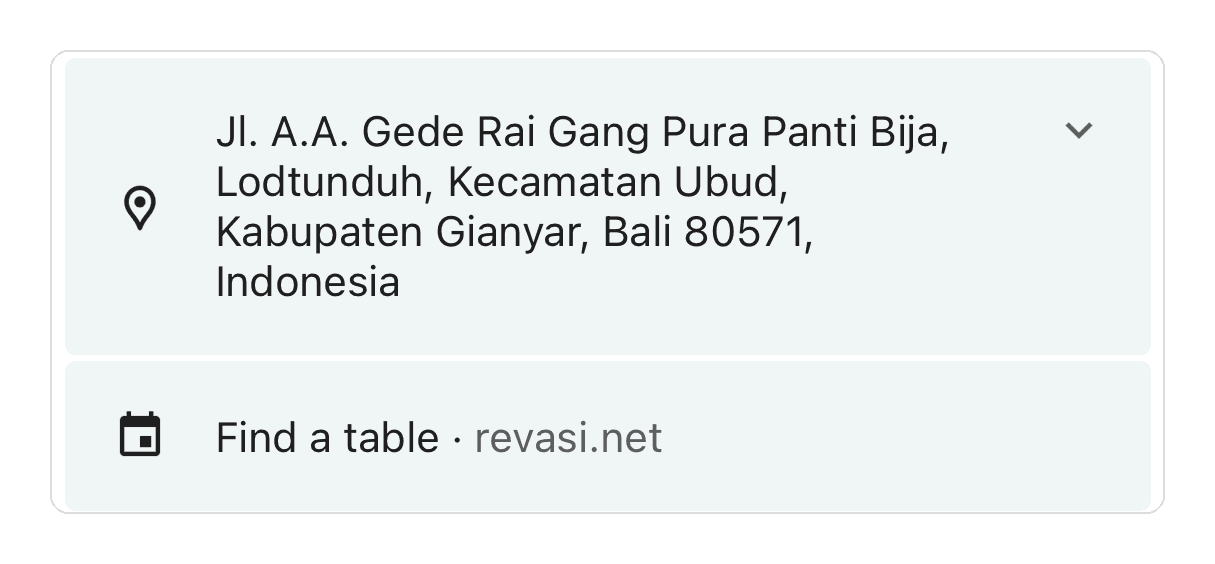
The first is a plain booking link on your Google Business Profile. You add a URL under Bookings, Links to your online booking tools, and your profile shows a Find a table line pointing at your domain. Any venue can do this. It needs no partner status, no integration and no involvement from your provider, and it appears within roughly 24 to 48 hours of being saved. It is a link rather than a booking flow, which matters more than it sounds: the guest leaves Google, lands on your page, and everything you sell is still on the table.
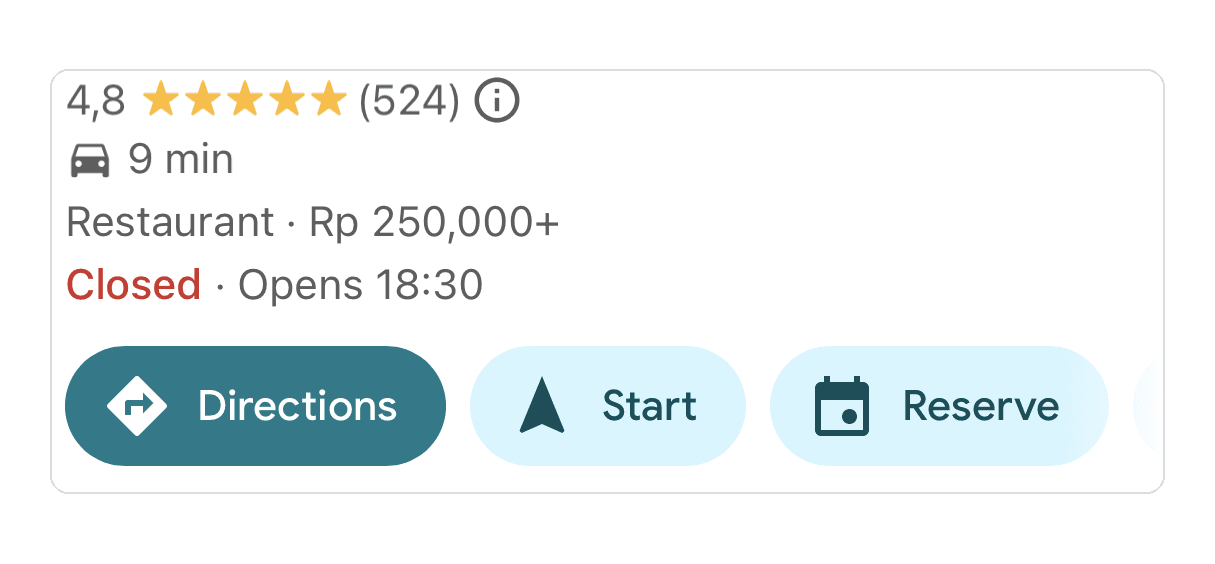
The second is the explicit Reserve button, the prominent one branded as Google Reserve, which opens a booking sheet inside Google and completes the reservation there. That requires your reservation provider to be an Actions Center integration partner, with availability feeds, booking endpoints and an agreement covering each merchant in the feed. A venue cannot switch it on with a URL, and no amount of configuration on your own profile will produce it.
That difference is the whole article. A Find a table link sends the guest to you, and you ask them everything you need. The Reserve button keeps the guest inside Google, and whatever Google's sheet does not ask, you never find out and never get to sell.
What the Google booking flow carries
The booking sheet is Google's interface, built to behave identically for every restaurant in the world. That generality is the point, and it is also the constraint.
| What the guest chooses | In the Google Reserve sheet | On your own booking page |
|---|---|---|
| Date and time | Yes | Yes |
| Party size | Up to 10 in Google search | Your own limit |
| Experience: cooking class, chef's table, tasting menu | No | Yes |
| Private dining room or a specific area | Not shown by default | Yes |
| Ticketed event or special night | No | Yes |
| Paid upgrades: beverage pairing, cake, daybed | Not permitted | Yes |
| Deposit or card hold | Depends on your provider | Yes |
| Nationality and where the guest is staying | No | Yes |
| Occasion and structured dietary fields | No | Yes |
| Photographs of the room, menu or experience | No | Yes |
| Marketing consent | Not supported | Yes |
What it leaves behind
Experiences, private dining and events
Guests see which time slots are available, and that is the extent of the choice. Formitable's support documentation states plainly that Google does not support its ticketed items, so guests see only available time slots (Formitable, checked October 2026).
This is the costliest gap on the list, because an experience is usually the highest-value thing you sell. A cooking class, a chef's table, a wine dinner, a themed night, a private room for ten: each one carries a price well above a normal cover, and each one has to be chosen at the booking or it does not get sold at all. Through the Google sheet the guest picks a time and nothing else. The class runs half full, the private room goes unsold, and the guest who would gladly have booked either arrives expecting an ordinary table.
If your Friday evening is a set menu and your Saturday is à la carte, the sheet cannot tell those apart either. The guest books a time and finds out what they booked on arrival, which is how a confident booking turns into a refund conversation.
The dining area
This one varies by provider, so be careful with the flat claim. Formitable states that Google does not show areas to guests the way its own booking widget does. ResDiary offers area selection on request, and puts the chosen area in the guest's Google confirmation email. Neither is the default.
So assume a guest arriving through Google has not chosen between your terrace, your bar, your private room and your main floor. Where those carry different minimum spends, as a private room almost always does, the booking lands on the cheapest one by default. Your highest-margin space becomes the hardest one to fill, and the only way to fill it is for somebody to phone the guest back and sell it manually.
Upgrades, pairings and anything else you charge for
Google's own platform policy is explicit here. Only payment instruments collected upfront during the Actions Center booking flow may be used, and they may not be used to charge fees, upsells or other costs beyond the booking price disclosed to the guest. A card already held on file against the guest's existing account cannot service the transaction either.
In practice that removes every pre-service upsell. The beverage pairing and the wine flight. The bottle on ice or the champagne on arrival. The birthday cake. The daybed or cabana. The set-menu upgrade and the chef's supplement. The caviar course. These are the add-ons guests say yes to most readily, because they are already committing and still in a generous mood, and they are the difference between a cover and a good cover.
Sold at the table instead, each one depends on a server remembering to ask, at the busiest moment of their shift, to a guest who has already decided what they are spending. Guests who choose their own upgrades at the booking stage do it without anyone selling to them, and that is simply a different revenue line.
The guest record, and the nationality you never learn
ResDiary lists exactly what transfers from a Google booking: first name, surname, telephone number, email and special requests. Custom fields and title preferences do not display. Google's policy also requires partners to use the identity Actions Center supplies when contacting the guest, even where it differs from the record already in their own database, which is one way duplicate guest profiles start.
Everything your own form asks arrives empty. The occasion. The allergy checkbox. How they heard about you. And, for any venue in a visitor market, the guest's nationality and where they are staying.
Guest origin is the field most worth having and the one Google never sends. It tells you which markets your covers actually come from, which months each market peaks in, which language to run ads in, which menu to translate, and which hotels and villas are worth a relationship. It is also what tells you whether a quiet Tuesday is a local problem or a flight-schedule one. A year of Google bookings leaves all of that unanswered, and no amount of reporting afterwards recovers a field that was never collected in the first place.
Permission to contact the guest again
This is the one most operators miss, and across a year it is the most expensive. Google does not support the selection of marketing opt-in preferences in the booking flow, so providers treat every Google booking as an opt-out. Under Google's platform policy, where a guest has not opted in, a partner may contact them to manage the service, and once after the visit, for example to request a review. That is the extent of it.
You served the guest, and you may not invite them back. A venue taking a meaningful share of its covers this way is not building a guest list at all.
How far ahead guests can book
There is a cap, and it is worth getting right, because one figure circulates as though it were Google's. It is not. Google's own documentation defines a minimum advance booking time and sets no maximum. The window comes from your provider: ResDiary states Google will offer a maximum of 30 days of advance reservations, while Formitable publishes 90. If you take festive-season bookings in September, check your own provider's figure rather than assuming either.
Party size
Google caps the searchable party size at 10 in its own interface, and the limit is Google's rather than yours. The Actions Center availability feed documentation puts the default maximum party size at 10, raisable to 20 through account settings. Larger tables, which for most high-end venues are the valuable ones, arrive through another channel or not at all.
What this costs, whatever kind of restaurant you run
Reservation platforms are usually compared on price and features. The more useful question is what each channel lets you sell.
A booking is three things at once. It is a seat held at a time. It is a chance to sell the experience, the room, the pairing and the upgrade. And it is the one moment a guest will happily tell you who they are and where they came from. The Google Reserve sheet is good at the first and carries none of the rest.
That hits every format, not just tasting menus. A pizzeria loses the Friday wine flight. A beach club loses the daybed and the cabana. A cafe loses the weekend cooking class. A bistro loses the private room upstairs. A bar loses the ticketed guest-bartender night. A hotel restaurant loses the guest's nationality, which is the number its marketing runs on. None of these are fine dining problems. They are one problem wearing different clothes: whatever you sell above the cover has to be chosen at the booking, and the Google sheet does not ask.
The loss is quiet, which is what makes it easy to miss. Nobody cancels. The covers still arrive and the service still runs. What changes is the average spend on those covers, and the fact that a share of your guest list each month is unreachable and anonymous. Both show up in the numbers months later, by which point they look like a demand problem rather than a channel one.
None of this is a fault in Google's product. It is a booking widget on a search engine, built to behave identically for every restaurant on earth, and that generality is exactly what strips the detail out. The mistake is treating it as your reservation system rather than as one door into it.
Do you actually need the Reserve button?
Most venues that want the button want it because they believe it is what brings the bookings. That assumption is worth testing before you pay for it, because it is usually wrong.
When reservations arrive from Google, the button is the last click rather than the reason for it. What put you in front of that guest was the profile: accurate hours, real photos, the right category, a menu, reviews that get answered, and a booking link that works. Venues that keep that profile in good order get found. Venues that do not, do not, button or no button.
Which means a venue with a well-maintained profile and a plain Find a table link would, in most cases, have taken a similar number of bookings. The volume is not the difference. The difference is that those bookings land on your own page, where the guest can add the pairing, choose the cooking class, ask for the private room, request the shuttle, tell you where they are from and tick the consent box. The same covers, worth more each, and a guest you are allowed to contact again.
The two look different on a profile, and the difference is easy to miss until you see them next to each other.
Find a table link. Free to add on any Google Business Profile, with no partner status and no involvement from your provider. The guest leaves Google and books on your own page, where the experiences, the upgrades and the consent box still exist.
Google Reserve button. Needs Actions Center partner status through your reservation provider. The guest books inside Google, and the reservation reaches you with five fields and nothing else.
If you already have the button, none of this is an argument for switching it off. Discovery is the hardest part of the funnel and Google owns it. Two things keep it working for you rather than against you, and a third makes the question largely academic.
- Price the gap rather than guessing at it. Compare average spend per cover on Google bookings against bookings from your own page, and compare how many of each you can legally email afterwards. If the difference is the pairing, the upgrade and the consent, you now have a number, and it is usually larger than any subscription you are weighing it against.
- Watch the mix, not the total. If the Google share grows while your direct bookings flatten, one channel is quietly replacing another at a lower value per cover. That is invisible if you only look at covers booked.
- Make your own booking page the better experience. Your website, your Instagram link, your email footer and every confirmation you send can point somewhere you control, where the experience, the private room, the pairing, the deposit, the guest's origin and the consent checkbox all exist. A Find a table link on your profile does exactly this, and it needs nobody's permission.
How to get a booking link on your Google Business Profile
You do not need partner status for a Reservations link, and most venues that believe they are missing one have put the URL in the wrong field. Three fields get confused.
- Menu link. Edit profile, Business information, Contact, Menu link. Put a booking URL here and Google renders Menu followed by your domain. Guests looking for a table do not find it. Point this field at your actual menu.
- Links to your online booking tools. Bookings, Links to your online booking tools. This is the right field. Your profile then shows a Find a table line pointing at your domain, and it appears within 24 to 48 hours once saved. Reload the profile after saving and confirm the value persisted, because an entry that never committed is a common cause of a link that never shows up.
- The explicit Reserve button. The prominent Google Reserve button, which books the guest inside Google rather than sending them to you. This one does require your provider to hold Actions Center partner status, and no URL will produce it.
One warning if you go looking for help. Merchant support has been known to answer that custom booking links are not possible without an authorised third-party provider. Live profiles running a plain Reservations link to an independent booking page show that the Bookings field does accept one. Check the field before you accept that answer.
Frequently asked questions
Does Reserve with Google cost the restaurant anything?
Google does not charge the restaurant a commission for the booking itself. The cost sits with your reservation provider, which has to be an Actions Center integration partner for the featured Reserve button, and providers price that differently. The plain Reservations link on your Business Profile is free and needs no provider at all.
How far in advance can guests book through Reserve with Google?
There is a cap, and it is set by your reservation provider rather than by a single Google rule. Google's Actions Center documentation defines a minimum advance booking time and no maximum. ResDiary states that Google offers a maximum of 30 days of advance reservations, while Formitable publishes 90 days. Check your own provider before you plan a festive season around it.
What guest information does a Reserve with Google booking include?
First name, surname, telephone number, email and special requests. Custom fields and title preferences do not transfer, according to ResDiary's documentation. Anything else your own booking form asks, including allergies, occasion and where the guest is staying, arrives empty.
Does Reserve with Google tell me where my guests are from?
No. The integration transfers first name, surname, telephone number, email and special requests. Nationality and the hotel, villa or area a guest is staying in are not among them, and neither is any custom field you have added. For a venue in a visitor market that is the most valuable thing missing, because guest origin is what tells you which markets to market to, which months they peak in, and which language to run ads in.
Do I need the Reserve button to get bookings from Google?
Not necessarily. The button is the last click rather than the reason for it. What puts you in front of a guest is a complete Google Business Profile: accurate hours, real photos, the right category, a menu, reviews that get answered and a working booking link. A venue with a well-maintained profile and a plain Find a table link will in most cases take a similar number of bookings, and take them on its own page, where upgrades, experiences and marketing consent still exist.
Can guests book a tasting menu, an event or a specific experience through Google?
No. Guests see available time slots. Formitable's documentation states that Google does not support its ticketed items, and ResDiary notes that where a promotion is mandatory, standard availability can stop displaying altogether unless the integration is excluded from that requirement. In revenue terms this is the costliest limitation, because a cooking class, a chef's table or a private room for ten carries a price well above a normal cover and only sells if the guest can choose it at the booking.
Can I charge a deposit or sell upgrades through Reserve with Google?
Deposits are available through some providers. Upgrades are not. Google's platform policy states that only payment instruments collected upfront during the Actions Center booking flow may be used, and that they may not be used for fees, upsells or costs beyond the booking price disclosed to the guest. That rules out beverage pairings, wine flights, champagne on arrival, birthday cakes, daybeds and set-menu upgrades at the booking stage. They have to be sold at the table instead, by a server who has to remember to ask.
Can I email guests who booked through Reserve with Google?
Only to manage their booking, and once after the visit, for example to request a review. Google does not support marketing opt-in selection in the booking flow, so the integration treats the guest as opted out. Anything beyond that needs a consent you did not collect.
Why does my Google profile show Menu instead of Find a table?
Your booking URL is almost certainly in the Menu link field under Business information rather than in Bookings, Links to your online booking tools. Move it, save, reload the profile to confirm it persisted, and allow 24 to 48 hours.
Do I need to be a Google partner to show a booking link?
Not for the plain Find a table link, which any venue can add through the Bookings field on its own Business Profile, and which sends the guest to your page with everything you sell intact. The explicit Google Reserve button is different and does require your reservation provider to hold Actions Center partner status.
Reserve with Google is a good front door. The question is what happens once a guest walks through it, and whether what reaches your reservation system is a table and a time, or a guest you can sell to, serve properly and invite back.
Revasi builds for the second. Two plans, one promise: direct bookings under your own brand, with zero commission, ever. Both plans run on a hosted booking page on revasi.net, where the experience, the private room, the beverage pairing, the deposit, the guest's origin and the consent checkbox all live on the booking itself. See pricing.
Related reading
Writes about how high-end venues actually run service: bookings, upgrades, and turning first-time guests into regulars.
Keep reading.

What Good Reservation System Onboarding Looks Like
Insights · 9 min read · October 19, 2026
How to Reduce Restaurant No-Shows: A Guide for Fine Dining Venues in Asia (2026)
Insights · 16 min read · April 29, 2026
SevenRooms Alternatives in Asia (2026): 5 Compared
Insights · 11 min read · April 27, 2026